


How to get to next step in installing Avira on Max OS Ventura

Hi outthere
I simply can't get to next step after the below! Done the things needed, but the installation don't seem to be completed.

-

I have the same problem :-(
Just opens a ticket.
1 -
Same problem with BitDefender by the way ;-)
0 -

Ich habe gerade den "MacOS Ventura V13.0 update" durchgeführt und stoße auf das selbe Problem!
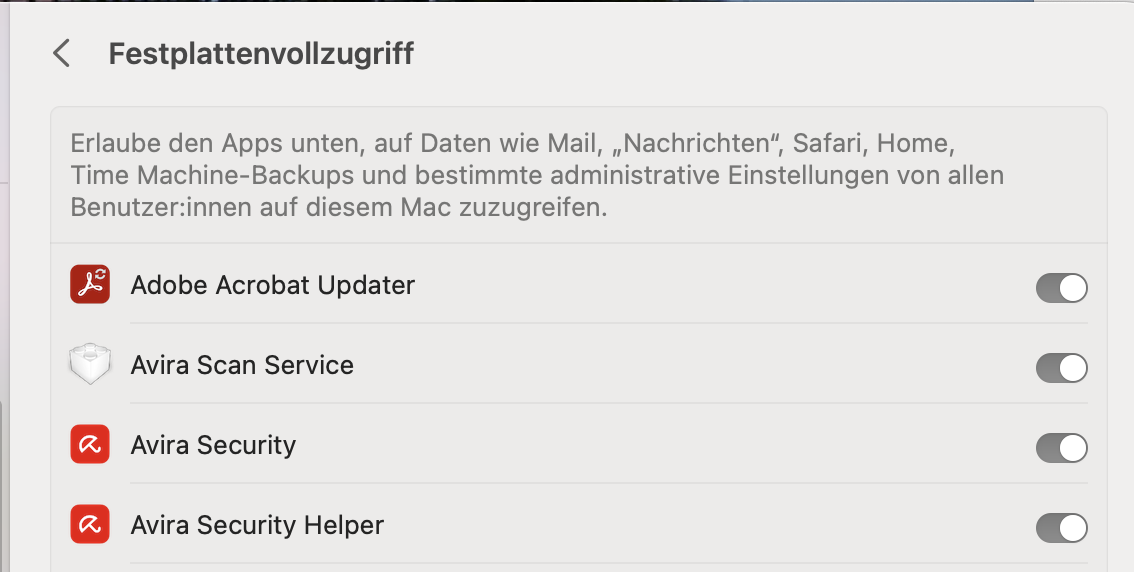
Die erforderlichen Festplattenvollzugriffe sind für Avira Security, Avira Security Helper, Avira Scan Service und für Avira Optimizer eingeschaltet. Trotzdem lässt sich Avira Security nicht installieren/aktivieren. Die Installation/Aktivierung bleibt bei der Aufforderung (sh. vorheriger screeshot!) "hängen"!
Hier ist von Seiten Avira dringendst Abhilfe per update zu schaffen!
3 -
Hi !
Here is the solution that works for me !!!
https://support.eset.com/en/kb8339-upgrade-your-eset-product-for-macos-for-macos-13-ventura-support
0 -

Gleiches Problem mit Ventura 13.0, Avira lässt sich nicht mehr aktivieren.
 0
0 -

I have the same issue and have already opened a ticket about 3 days ago, still no response from support as of yet. Will post a solution once received. Cheers.
I am stuck at this screen:
 1
1 -

Ich habe das gleiche Problem. Update auf Ventura und die Installation kann nicht abgeschlossen werden, obwohl die Schieberegler alle an sind. Der Avira Schirm öffnet sich nicht. Bitte dringend Abhilfe schaffen!
0 -

A bug in the latest MacOS update, Ventura, is currently breaking some of the functionality in third party security tools such as Avira. Apple is aware of the issue, but they need to fix it, Avira can't do anything about it. This bug is also affecting other vendors such as Bitdefender, Avast, and Malwarebytes.
0 -
Same Problem: full disk access is allowed but but Avira says it is not
0 -
This fix was sent to me by Avira Customer Support, and it did work for me. Best wishes to all.
------------------------------------------------------------------
The workaround worked for all the other customers, please try to completely uninstall Avira from your device, reboot the device, and reinstall.
To uninstall: https://support.avira.com/hc/en-us/articles/360000759429-How-do-I-uninstall-Avira-Security-for-Mac-
Reboot the device.
Install: To install your Avira product, please follow these steps:
- Log in to your Avira account.
In this video we show you how to log in to your account:
Your Avira Customer Account: Login
If you are unable to remember your password, click Forgot your password. You will receive a link via email to reset your password.- Once logged in, click Subscriptions in the menu on the left.
- Click Install.
- Do one of the following, depending on your browser:
Google Chrome: Click on the downloaded file in the bottom left-hand corner.
Firefox or Safari: Save the file and open it from the Downloads list (top right).
Internet Explorer: Click Run at the bottom of the screen.- Click Accept and Install.
Your Avira product is now installed and activated.
Workaround: In the Full Disk Access panel you need to select the "Avira Scan Service", then click on -, leave the Full Disk Access Page, go back to it.
Now the Avira Scan Service should have reappeared which then can be re-enabled.
-1 -

Same !
0 -

This Tip will help...
Hallo zusammen,
dieser Tipp hilft Avira unter Ventura wieder Zugriff zu gewähren https://www.sir-apfelot.de/antiviren-apps-festplattenvollzugriff-problem-unter-macos-ventura-beheben-46305/
Danach noch einmal den Mac neu starten und im Avira-Tram-Icon "Schutz aktivieren" - läuft wieder!
VG und schönes Wochenende
Manfred K.
0 -
Hab heute ein Update gemacht (Ventura 13.0.1) und Avira ebenso, nun funktioniert's wieder. 🥳
0 -
Ich kann bestätigen, dass das Update auf 13.0.1 automatisch die Funktion wieder hergestellt hat.
0 -

With latest update Ventura 13.0.1 Avira is up and running again on my Macs (updateted two different installations recently).
0 -

I've found a workaround for this...select the two Avira components on the Full Disk Access panel then scroll to the very bottom of the list and click the minus button shown in the image. This will get you out of the hole and the setup will continue.
 0
0
Bitte melden Sie sich an, um einen Kommentar zu hinterlassen.
Kommentare
17 Kommentare