


"29 Issues" Pop-Up Screen Won't Respond
Abgeschlossen
For the past few weeks I have periodically had an Avira AV window appear in the lower-right corner, saying "29 issues detected". It offers "review now" and "remind me later" options and the little "close" X in the upper corner. Unfortunately, none of them cause any response and the window just sits there on top, obscuring anything in windows behind it.
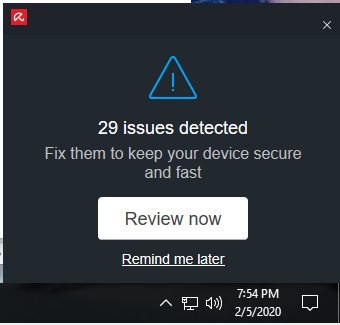
When I reboot, it goes away and may not return for a day or two, but when it does, I still can't get a response out of it. Also, none of the other Avira modules will start.
I'm running Windows 10-64 Home at the 2020-01 rev level. The Avira package is v.1.2.143.109 and Avira Security is 1.0.20.7408. I can fill in other package versions if needed.
HELP!!
-

Hello,
As we need to investigate this issue at a deeper level, we've created a support case for you. You'll get an email soon.
Best,
Arthur Lukas Huptas
Avira Community Manager
-1 -
Many thanks. I received the email and will send you the information you requested.
0 -
I wonder if there has been any progress with this issue?
I have exactly same issue. (Been since a new version update maybe in January). Even that "29 issues" is the same so I suppose that this has nothing to do with issues in my computer.
I have windows 7 and Avira Free. I suppose that this is related to the update that pushed all of the Avira components into my machine without my permission. The program updater demanded over 500 MB of the memory and stayed there permanently so I removed it and some other of the components too. Now there's only Avira, Avira Security, Avira Antivirus and Phantom Vpn on my Control Panel Program list. Maybe the two first ones are trying to check my computer and fail because of missing components?
This Popup vanishes if I stop the process SystrayUI (or something like that; that process seems not to be on the process list just now!??; does it appear only when the popup sticks??)
I've had this same problem a couple of years ago. Then it was solved by putting avira.com to the trusted sites list of the Internet Settings of Windows. Now that doesn't work.1 -
Hello, I am having the exact same issue. i am pleased to hear someone is working on it. What should I do to also get a ticket number or support case? Thanks.
1 -
Hello, I am having the exact same issue on Windows 10 since some weeks ago!!!
This picture covers a peace of my screen and is EXTREMELY IRRITATING because
the only way to take it off is to restart the computer until it shows up again!
I'm so tired of it that bug that I intend to uninstall your software if it will keep showing up!!!PLEASE, FIX THE BUG ASAP!!!!!!!!!!!!!!!!!!!!!!!
Thank you 1
1 -
This issue is >2 months old. How is this not fixed yet?
You must be losing so many users on this, and I can't believe such a critical bug hasn't been a 1st prio right from the start. I mean.. it's a simple popup.. If you can't fix the problem, simply don't make it show up in the first place. Really should not be this hard, Avira.
If this isn't fixed in a couple of days, I will be looking for other AV alternatives.0 -
Honestly, as the initial filer of this bug notice, I see it as a minor inconvenience. Yes, you lose a little screen space and it's a small annoyance, but hardly merits the harsh words above.
0 -
I have had the same issue as the writers above me had. I went to task manager (right click on the task bar at the bottom) and after some trial and error closed the application (end task) "Avira Security (32 bit)". There are 2 of these on my computer and I just chose the one on top. The pop up screen then closes and you can continue as normal. It didn't seem to affect the running of Avira in any other way, but I am certainly no expert. It did reduce the inconvenience of the pop up though. I imagine that this probably won't be fixed until Avira updates to a newer version, so it may be worth checking other antiviral software if you find that it is mucking up the performance of your current Avira.
0 -
Hello @... - This issue is fixed by our dev. dept. So please update your current installation and see if this issue is now solved.
Best,
Arthur Lukas Huptas
Avira Community Manager
0
Post ist für Kommentare geschlossen.
Kommentare
9 Kommentare