


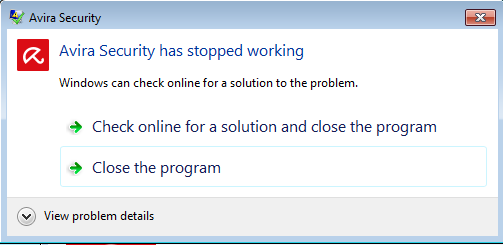
Message "Avira Security has stopped working" when installing the last version on windows 7.
Abgeschlossen
I can't install the last version of the Avira Security Desktop on Windows 7. The commented message appears when it is installed and then when I execute the program; therefore, I lost that functionality, and I can't use the last Avira Prime version acquired.
I appreciate it if someone can help me.
-
Problem signature:
Problem Event Name: APPCRASH
Application Name: Avira.Spotlight.UI.Application.exe
Application Version: 1.0.42.14100
Application Timestamp: c9173ab0
Fault Module Name: KERNELBASE.dll
Fault Module Version: 6.1.7601.19160
Fault Module Timestamp: 56bcd5c3
Exception Code: e0434352
Exception Offset: 0000c52f
OS Version: 6.1.7601.2.1.0.768.3
Locale ID: 11274
Additional Information 1: 0a9e
Additional Information 2: 0a9e372d3b4ad19135b953a78882e789
Additional Information 3: 0a9e
Additional Information 4: 0a9e372d3b4ad19135b953a78882e7890 -

Hello Hugo,
You have posted your request here in a publicly accessible forum. Personal data cannot and must not be processed here in accordance with the Data Protection GDPR.
This is an older version of Windows (7) which is no longer supported by Microsoft. Complications with the new technical developments can occur here. Therefore, your Windows 7 system would have to be technically checked, which we cannot do here in the community (data protection).
To check your installation, we would create a ticket for you with the support team so that the instructions and correspondence can be exchanged by e-mail in accordance with data protection.
For this purpose, we need a declaration of consent to forward your contribution to the support team.
We will only forward your contribution immediately after we have received the declaration of consent, just please let us know.As a customer of the Premium products with a valid licence, you can also contact the support team directly:
- https://my.avira.com/en/dashboard/support/tabs/support
- or
- https://support.avira.com/hc/en-us scroll down to Contact Avira
If you wish to forward your contribution to the support team via the community, we expect your feedback.
If anything is still unclear, please let us know, and we will be happy to help.Best wishes and a peaceful pre-Christmas time
0 -
Hello,
Ok, please, forward this contribution to the support team.
Thank you very much.
Best wishes and happiness at this end of the year.
Hugo.
0 -
Hello Hugo,
Thank you for your feedback.
Your request has been forwarded to the support team for detailed analysis. You will receive further information from there in the near future.
Thank you for your understanding.If anything is still unclear, please let us know, and we will be happy to help.
Best wishes and a peaceful pre-Christmas time
0 -
Ok, thank you.
Best wishes,
Hugo.0 -

hello we have the same problem
0 -
 0
0 -
Hello Genesis Maestre,
This is an older version of Windows (7) which has not been supported by Microsoft for a long time. Complications can arise here with the new technical developments, which can also no longer be corrected in the versions that are no longer kept up to date.
You can try uninstalling the Avira product and then reinstalling it.
1. Uninstall Avira and restart the computer
2. Reinstall your product
It would also be important to consider an up-to-date operating system to be on the safe side.
If anything is still unclear, please let us know, and we will be happy to help.Kind regards and have a nice weekend
0
Bitte melden Sie sich an, um einen Kommentar zu hinterlassen.
Kommentare
8 Kommentare