


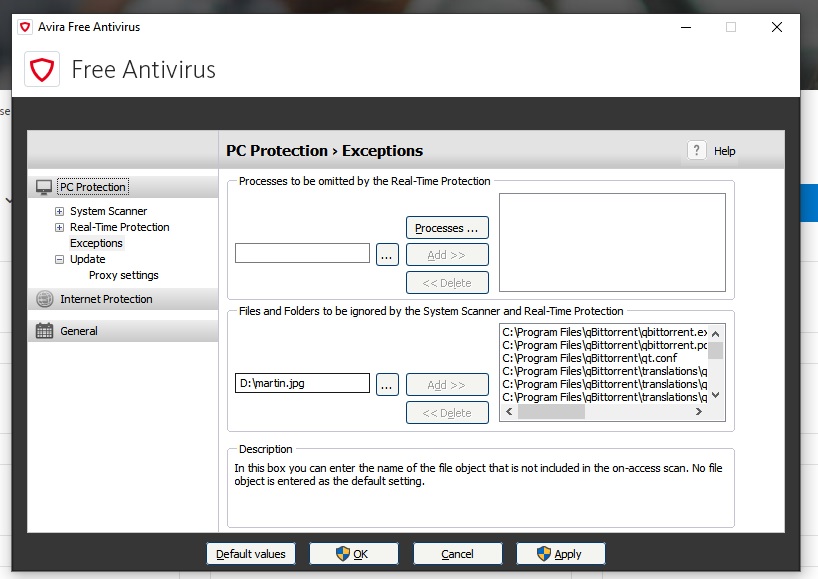
Add to exception greyed out
Terminée
Hi
When I go to settings to add a file to exceptions, the option is greyed out.
I started avira with admin rights, I tried files from C:\, from D;\... but nothing.
-
Apparently there's a limit to exceptions. Which is weird.
After deleting a couple of lines, I can add new now.
And by the way, the list was full because your scanner for some reason automatically deleted my qBitorrent which is even weirder, flagged it suspicious.
And the really weirdest thing is that deleting qBittorrent only happens when I update PotPlayer. Potplayer has some adware in their installation and whenever I update Potplayer, Avira decides to automatically delete qBitorrent.
Isn't that awesome?
Also, did I tell you that I spent days figuring out why my scanner doesn't work?
Guess whose fault?
Avira's.
It added a driver where it shouldn't and there was a conflict with the scanner driver. Did I tell you where I found the solution? On the 3rd page of Google, on a non-english forum.
Why do I keep using Avira is probably the best question that can be asked now.
0 -

Hello Anon,
Well, there's a limitation for exclusions. So in your case please set just one exclusion to the path which shouldn't be scanned:
C:\Program Files\qBitorrent\
Also, feel free to submit this as suspicious marked files directly to our virus lab for a re-analyze:
https://analysis.avira.com/en/submit
Best,
Arthur Lukas Huptas
Avira Community Manager
0 -
Hi Arthur and thanks for your reply.
Thanks for the suggestion of adding the whole folder.
Even though I tend to be the "doer", submitting software as popular as qBitorrent for re-anaylzing is something I don't feel like doing.
0
Cette publication n’accepte pas de commentaire.
Commentaires
3 commentaires