


Windows 10 wont update - claims Avira needs removing

I did once have Avira installed on the PC but thought that it had been uninstalled months ago. I've followed carefully the instructions for total removal and there are no apparent Avira files or folders on my drive. Search done for *vira* with "Show hidden/system files" operational. Next I downloaded the Avira registry cleaner and ran that in Safe mode. Yet still Windows 10 wont update and wants Avira manually removed!
-

Hello Malcolm,
Microsoft searches the computer for old installation files and then throws out the error you mentioned. Please check if there is still an old Avira setup file somewhere (e.g. in the download folder) and delete it. Afterward, the update should be possible.Best,
Dominik Klesel
Avira Customer Service Engineer
0 -
Hi
I've just done another search of the drive containing Windows 10 searching on the term *.avira* and nothing is found. I can see nothing in my download folder. Surely, an old installation file would contain "avira" within it's name? If so I can very confidently say that no Avira file exists on the drive.
0 -
I've found the problem - the Registry Cleaner is not doing it's job! When run it reports that not all the selected keys could be removed and to restart the computer in safe mode and then run the cleaner. I do this and run the cleaner which reports success and that all removed changes will be active after a restart. Restart and run the cleaner again and it again reports that not all key could be deleted, start in safe mode .... So the registry keys are not being being deleted!
0 -
Hello Malcolm,
like written before, the newest version of Avira is fully compatible with Windows 10. But you can uninstall all the other remainings with the Microsoft tool as described under the following link:https://support.avira.com/hc/en-us/articles/360002518898-The-older-version-of-Avira-cannot-be-removed-Avira-requires-a-CD-Rom-during-installation
Here you find also more information for your issue:
https://support.avira.com/hc/en-us/articles/360000802545-Windows-Update-reports-incompatible-Avira-product-with-Spring-Creators-Update-Redstone-4-Best,
Dominik Klesel
Avira Customer Service Engineer
0 -
I'd read both of those before posting here.
"like written before, the newest version of Avira is fully compatible with Windows 10. But you can uninstall all the other remainings with the Microsoft tool as described under the following link:" The link says to download the Microsoft tool, I did and when run Avira is not listed as a program to remove so I selected the 'Not listed' option. I got no further because it then asks for the Product Code of the unlisted program. If you can give me that I'll try again.
Link 2 assumes that Avira is still installed on the computer. It is not in my case. Are you suggesting that I re-install it,followed by an uninstall on the new version since I don't wish to retain Avira on my machine?
And what about the Avira Registry Cleaner not removing the entries? Why is this?
0 -
Hello Malcolm,
when the Microsoft tool doesn´t find an Avira program, it is uninstalled correctly and there is nothing to delete.
In the second link in the note, it is described what you have to do when the windows update is still not working.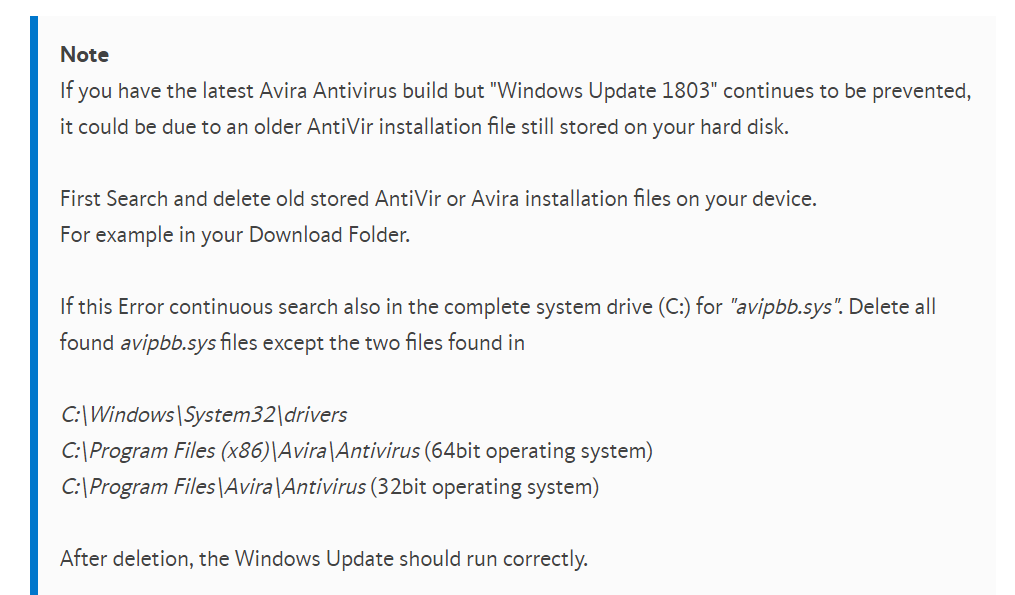
So please perform the steps as described and the Windows Update should run correctly.Best,
Dominik Klesel
Avira Customer Service Engineer
0 -
This is becoming frustrating!
"when the Microsoft tool doesn´t find an Avira program, it is uninstalled correctly". So you are saying it has been uninstalled correctly? Yes?
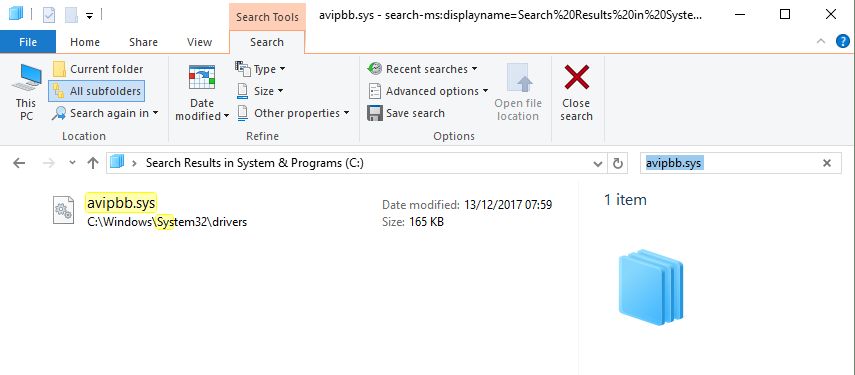
"In the second link in the note, it is described what you have to do when the windows update is still not working." And as I said before I'd already done that. A screenshot is attached showing a search for avipbb.sys. There is no other file of that name other than the one in C;\Windows\System32\drivers which the instructions say to leave alone. There is no copy of this file in a second folder since there is no Avira folder in any Program Files directory.
A screenshot to also prove that no file or folder containing 'avira' exists. I did a similar search for 'antivir' with again no result.

The third screenshot shows how Windows Update still insists that Avira needs removing.

You seem to be ignoring my observation that the Registry Cleaner is not removing Avira entries. Can I assume that this doesn't matter and there is no need to have them removed? In that case why do Avira provide a utility which isn't needed?
0 -
Hello Malcolm,
did you delete the avipbb.sys from your first screenshot? It could be that this needs to be done in safe mode.
This should solve the problem.
You wrote that in safe mode the registry cleaner showed all entries were deleted. When you perform the registry cleaner without safe mode and it can´t delete any entries, because there isn´t anyone it always suggests to restart in safe mode.Best,
Dominik Klesel
Avira Customer Service Engineer
0 -
OK - I've finally been able to update Windows after deleting C;\Windows\System32\drivers\avipbb.sys but I'm not as happy as I should be.
It's taken 2 whole days to solve what was wrong caused by the Avira provided instruction at https://support.avira.com/hc/en-us/articles/360000802545-Windows-Update-reports-incompatible-Avira-product-with-Spring-Creators-Update-Redstone-4- being INCORRECT!
These instructions say "If this Error continuous search also in the complete system drive (C:) for "avipbb.sys". Delete all found avipbb.sys files EXCEPT the two files found in C:\Windows\System32\drivers ....", my capitals.
Would you please ensure that these instructions are corrected so that nobody else has to waste two days, or maybe even give up on keeping their Windows system safe and up to date?
0 -
Hello Malcolm,
glad the problem is solved and thank you for your feedback.
I will forward your feedback directly to the responsible colleaguesBest,
Dominik Klesel
Avira Customer Service Engineer
0
Vous devez vous connecter pour laisser un commentaire.
Commentaires
10 commentaires