


Is this an attack or a bug on avira mac?

This strange spontanious reload of multiple primarly asian language packs happend yesterday.
see below.
Please try to clarify.
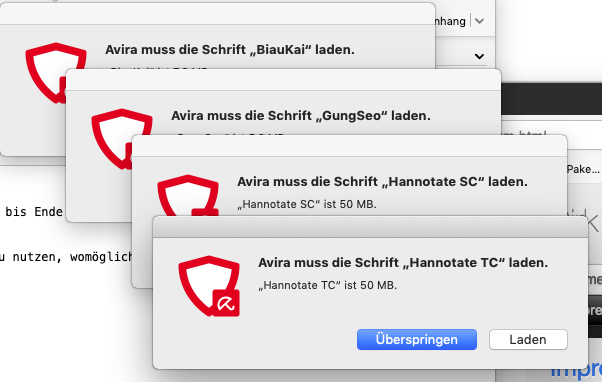
-
Hello,
Which operating system version are you using and did you ever delete any system fonts to free up space on your Mac?
Best
Toni Ruch
Avira Community Manager0 -
Mac OS - 10.14.6
Avira newest Update - free Version.
No, I did never delete any part of Avira, never deleted fonts or used any "clean up routine"; maybe apple's installer did so during an upgrade/update - but I did it never willingly. This is strange becaue it never happend before. I found nothing in the community. But why should Avira virus scanner load over 50 megabyte fonts each? (fonts are normal rather small in 500 kByte )0 -
Hello,
Since this is nothing we've seen at Avira before I've looked into other communities.
Nevertheless, I would like to investigate this a bit more. Could you therefore please tell me the exact version number of Avira that's on your mac?
Best,
Toni Ruch
Avira Community Manager0 -
How can I look up my Version on mac os?
0 -
You can check the version number by opening the Applications folder on your Mac, right-click on Avira and select "Information".
0 -
OK, thanks.
It is Version 4.0.3.11 -
Thanks for that Redrabbit. Did you cancel or download the fonts? How is the situation now on your mac?
0 -
Of course I did not consent. I canceled the download.
Mistake did not happend again until today.
0
Vous devez vous connecter pour laisser un commentaire.
Commentaires
8 commentaires