


Not possible to click on "allow" when installing Avira Prime on macOS Big Sur

I have updated from Avira Antivirus to Avira Prime. I have completely uninstalled Avira Antivirus, but when I try to install Avira Prime the "allow" tab cannot be found at all. Screenshot attached. Thanks in advance for your help.

-

I have the same problem....
0 -

Let"s hope they have a fix for us.
0 -
I've emailed a request to customer support and will post here if I get a response.
0 -
I have the same problem too...
0 -
 0
0 -
I followed the above instruction and the programme loaded successfully.
0 -
I have tried the workaround, it works for Antivirus Pro but for Avira Prime it doesn't.
0 -

same problem here....:-((
1 -

Hello,
Avira Free Security is fully working with macOS 11 Big Sur. Please make sure, you've downloaded the latest version:
https://www.avira.com/en/free-security
If you're having an active Avira license, please login into after installation is completed.
Best,
Lukas Huptas
Avira Community Manager
-1 -

@ Luca Cantaluppi
Hello Luca,
You have replied with a "no-reply" e-mail. This is a notification e-mail, which is only used to inform you about a new comment in your post and will then be deleted. These e-mails cannot be integrated into the forum here to your community post.
We have seen that you have already opened a support ticket with several questions and answers in connection with the support team.With personal data to licenses this is also good so, these may not be published here in the forum - Data protection GDPR. Therefore, we would like to ask you to continue to write in your support post with further questions to stay in one thread with time-consuming checks and instructions.
Thank you for your understanding.Best regards and a nice weekend
0 -
I have paid for Avira Prime, and it does not work. Do you have a fix for this? I am not speaking for the free version. If the Prime does not work, can you please send me a refund.
John R Mangiardi
0 -

I have the same problem 14 Dec 2020
0 -

Same problem here. After installing Avira Free Antivirus, there is no allow button to click on. I’ve already uninstalled and reinstalled Avira Free Antivirus several times. I did a clean install of Big Sur succesfully. I can’t find good fix for this problem in the community, the workaround suggested for paid customers isn’t working for me, I only want the free antivirus to work I can’t find where to log in with my account (I’m not a paid customer). Can you please tell me how to fix this? It seems like a software communication problem between Avira and Big Sur. Previous versions on High Sierra and Mojave always worked perfectly for me.
0 -

The same problem for me impossible to have the update with my prime version.
When the problem will be fixed?0 -

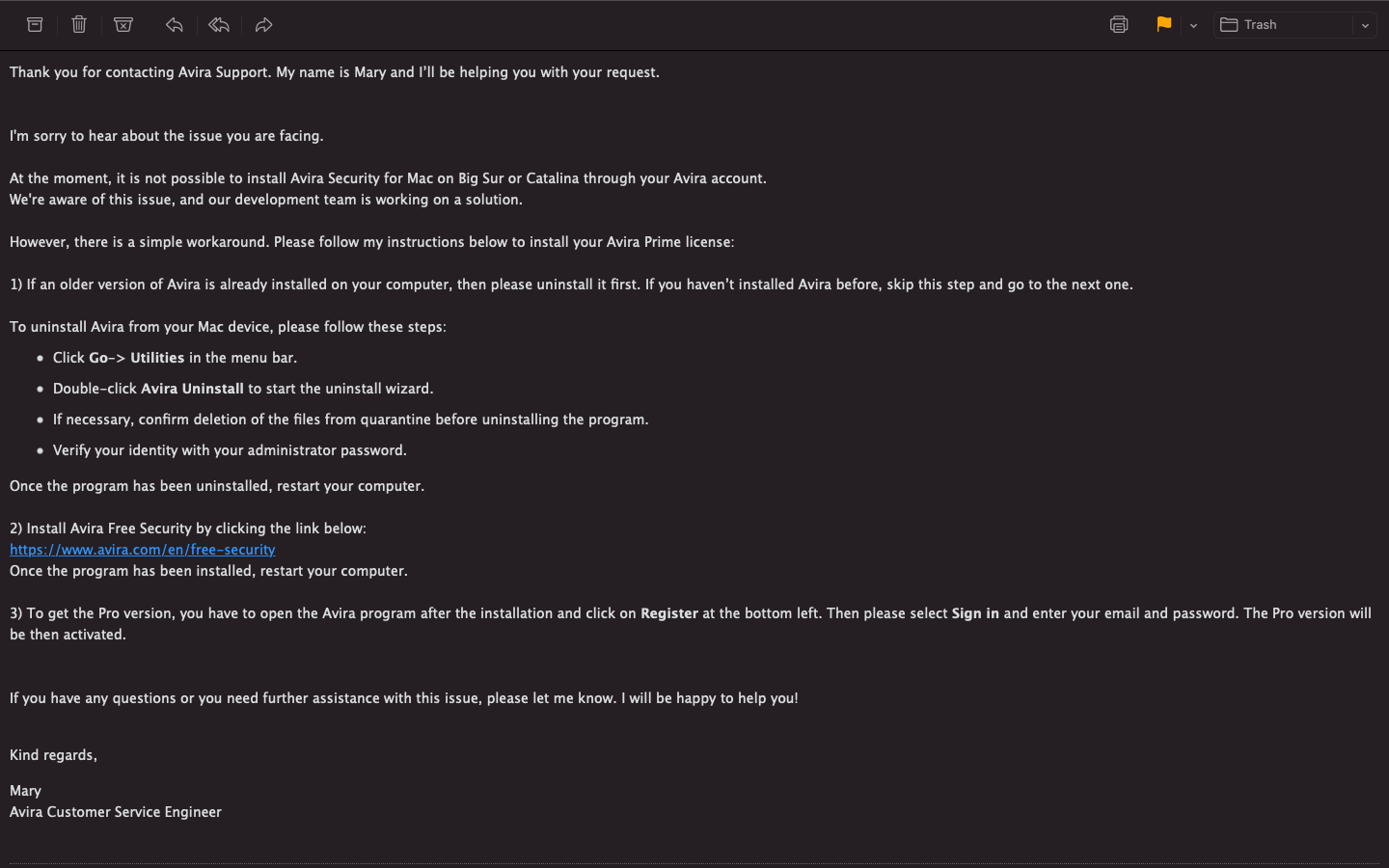
Worked for me today. I followed the instructions Stephen posted (screenshot of email).
- Uninstall Avira with the Avira Uninstaller in Applications-Utilities.
- Install free Antivirus from https://www.avira.com/en/free-security
- Restart your Mac.
- Open Avira Free Antivirus.
- Here you are requested to click on "Allow" in System preferences - it works fine. (you can possibly do this even before the restart, not sure).
- Free Antivirus is set up correctly.
- Click Register on the bottom left.
- In web browser that opens, log in to your Avira account. Allow opening app (Avira) in the browser pop-up window. (Chrome for me)
- That's it!
0
Vous devez vous connecter pour laisser un commentaire.
Commentaires
15 commentaires