


Cannot Setup Avira Security 1.7.4

Avira apparently downloaded and installed Avira Security 1.7.4 on my Mac. I noticed the icon had changed to a carrot, which indicates a problem. Clicking on the carrot shows 2 choices - 1. Your Antivirus Protection Is Off and 2. Set Up Antivirus Security. I chose Set Up and was rewarded with the Mac Security & Privacy page. I followed the instructions - unlocked the SecurityPrivacy page, added Avira Scan Services and Avira Security to Full Disk Access (they already had that permission, so why I was asked to do that makes no sense). However, the last activity says to select Later on the Setup page. There is no Later button. There is an All Done button but it is grayed out - the user cannot press it. Hence the process will not finish. The user is stuck here and there is no way to resolve this condition. I have rebooted several times and no progress. I have Force Killed Avira several times and no progress. Your application remains stuck at the same place. Clearly your app is not functioning properly. The one "change" it demanded I made did not even need to be done. I did un-check both Avira Scan Service and Avira Security from Full Disk Access and then Re-Add them. Did that work? Of course not. Because your application was not designed properly. How to resolve this condition?
-
Commentaire officiel

Hello,
Sadly we're facing an issue/ bug with our latest installation kit (v 1.7.4) and macOS Catalina (10.15.x). Our developing team is currently working on a fix but in the meantime, we can provide this workaround:
Workaround to unblock the situation:
- in the full disk access section
- click the "+" icon
- type in the search area "Avira Security Helper"
- select the file in the results
- click "open"
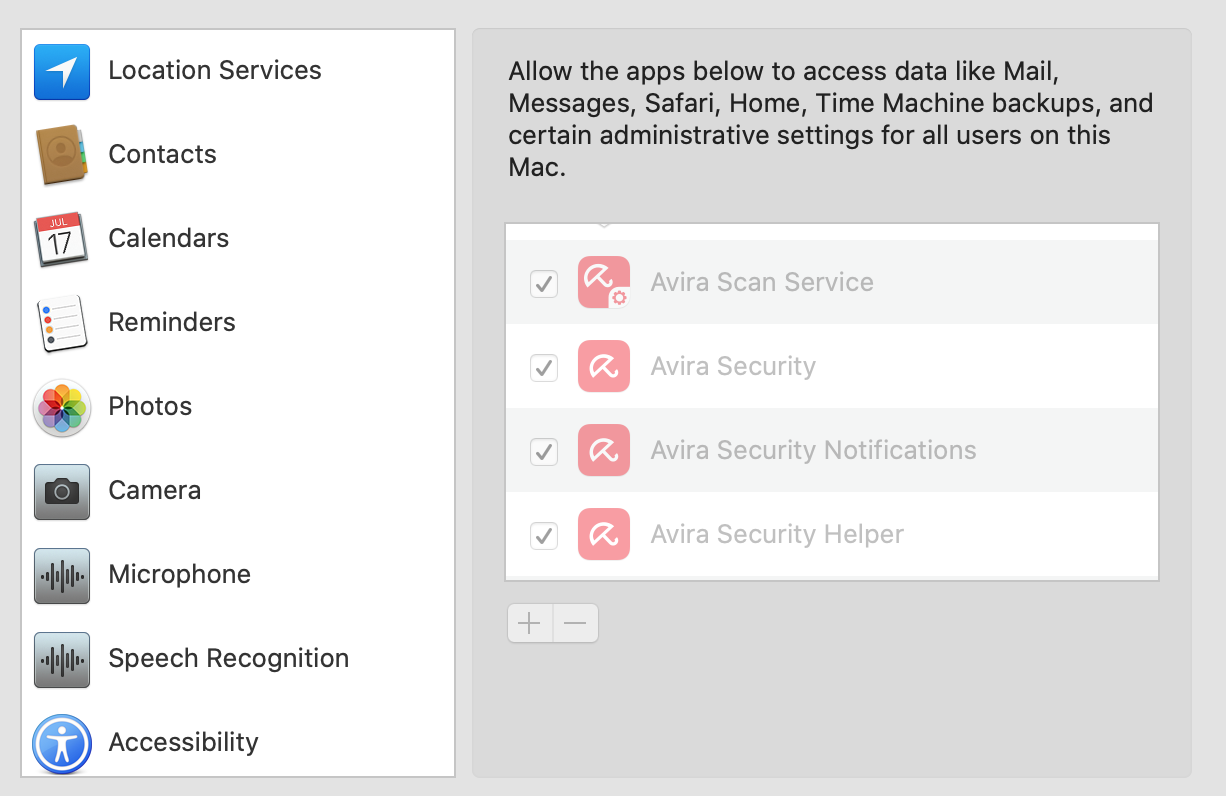
This should add the missing service and unlock the setup step to finalize the process.
Best,
Lukas Huptas
Avira Community Manager
-

I am having the exact same issue, but I can not seem to find anything that indicates a fix.
1 -

I have the same problem. By the way, I don't think that's a carrot. I think it's a closed umbrella.
2 -
I tried uninstalling Avira Security. I first went to Activity Monitor and Force Quit all Avira processes. Then I went to Applications folder and moved all Avira software to the Trash. Then Emptied the Trash. Then rebooted. The reboot went fine - no left over Avira processes were present. Then I did a new Install of Avira Security 1.7.4. Now things are WORSE than they were before. The Set Up now stops working one step earlier than it did before. The only thing I noted (which probably is nothing) is that the Set Up dialog screen says to click on the Allow button after entering your Administrator credentials on the System Preferences->Security&Privacy tab. There is no "Allow" button. There is an Unlock button. So if the software is looking for the user to click on Allow that cannot happen. Since there is no Allow button. My MacOS is 10.15.7, meaning it is fully up to date. So the only idea I have left is to stop using Avira (until they fix it) and use something else. Avira has made no attempt to respond so far.
0 -
I too have the exact same problem. Also, cannot run a scan, set schedule or anything else.
0 -
I finally got it installed. I removed (not just unchecked) all Avira items from the Full Disk Access list first and then installed again. The All Done button was not greyed out anymore.
1 -
Thank you Wing! Many people will be happy to know there is a way to get beyond this issue.
0 -
I did as Wing did but made no difference still does not install!!
0 -
I have tried the workaround that Lukas suggested but the search does not find the Avira Security Helper file.
0 -
Maybe I did it by luck. Just here to share my experience. I used AppCleaner to uninstall Avira and then reinstalled with the new download. I failed a few times and the All Done button was still greyed out.
What I did last time was to use AppCleaner to uninstall Avira first. In Full Disk Access area, I hit the '-' button to remove Avira Scan Service and Avira Security - Avira Security Helper was not on the list at that stage. I used the download file to install Avira v 1.7.4. Follow the steps and tick the boxes of Avira Scan Service and Avira Security in Full Disk Access area as they reappeared on the list. This time, the Avira Security Helper also slowed on the list and the box was already checked. After that, I could press the All Done button to complete the installation. I hope it helps.
0 -
When I tried the reinstall I only got Avira Scan Service in the Full Disk Access area i.e. both Avira Security Helper and Avira Security were not listed to be selected. Yesterday when I did a reinstall Avira Security did appear in the list but using the download from today it didn't appear!
0 -
I was experiencing the same problem. I followed the instructions given by Lukas Huptas and the application seems to be working fine again.
0 -
I had this issue. The all done button was greyed out. I went back to preferences and clicked add and searched for Avira. I added all four that I found and then the button could be clicked.
 0
0
Vous devez vous connecter pour laisser un commentaire.
Commentaires
13 commentaires