


Cannot complete the installation on macOS 10.15.7
Répondu
I am evaluating Avira so running the community edition. Version is 1.7.4.
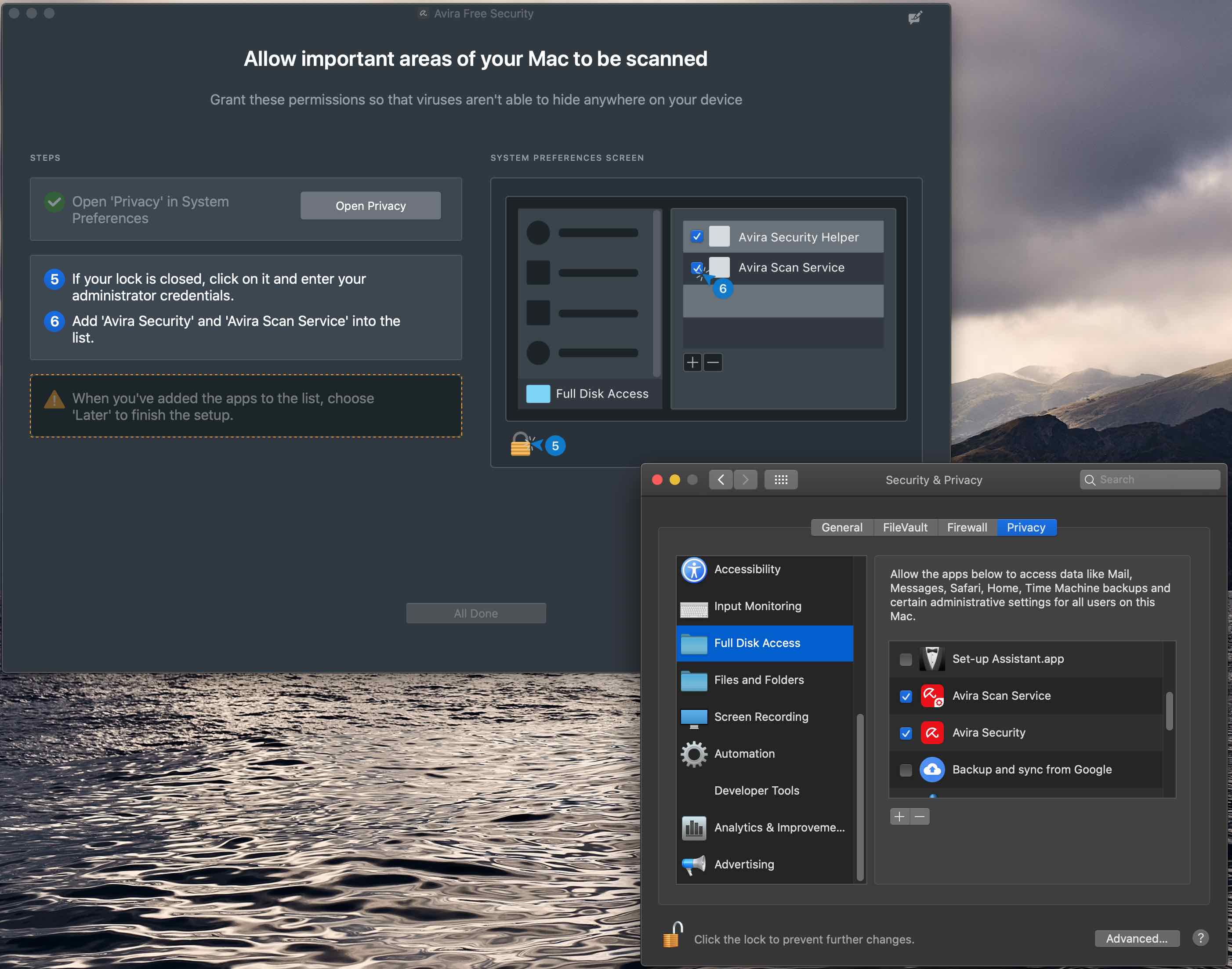
When I install avira I give the system full disk access, but the All Done button is never enabled.
This happens irrespective of whether I click Later or Quit after selecting to give access.
-

Hello B Baker,
Unfortunately, without further information, we cannot say where this behaviour comes from.
Where did you download the version from? Have you ever tried to uninstall and reinstall?Did you follow these instructions:
Installation of Avira Security for Mac – Official Avira Support | Knowledgebase & Customer Support | AviraWith the answers and precise information, we will try to help with concrete details. Thank you for your understanding.
Many greetings
-1 -
I also have had this issue for weeks.
Today (August 20th 2021), I installed all available OS updates for MacOS Catalina 10.15.7, and restarted my machine.
Once it had rebooted, I opened the Security & Privacy settings in the System Preferences panel. Selected the Full Disk Access option and immediately noticed that there is now a third option for the Avira Software that you have to grant access to. There is:
- Avira Scan Service
- Avira Security
- Avira Security Helper
Once I granted full disk access to all three options, the software started working again.
1 -
Hello B Baker and pascha45,
I have the same problem. Following the instructions above works fine until I get to
Enable scanning of significant areas
...
7. Click Done.I give access to Avira Scan Service and Avira Security, click later and the lock item. But I can't click All Done because it is still disabled. I couldn't find a solution yet.
Maybe there are some parts, that have not been uninstalled from my previous version of Avira Antivirus. I uninstalled it by drag&drop into the waste basket.
Best greetings
Ralf
1 -
This is a text in a translation software, so it might be strange, but thank you in advance.
There are items to add.
These are the previous two items and "Avira Security Helper.app".
This data is in a different location, in the "Library/Application Support/Avira Security".
When all three are present, the step number becomes a check mark and the setting is completed.
Good luck!4 -
pascha45
>Where did you download the version from? Have you ever tried to uninstall and reinstall?
Download was from your website: https://www..com/en/start-download/product/1765/-I12e2mvtstLKUkGnG-U3eKJ0uofLc0hXIMQTgSEaOJmPS2GU8kOkIfo
I have uninstalled and reinstalled multiple times. I have installed as add min user and normal user using admin password....
>Did you follow these instructions:
>Installation of Avira Security for Mac – Official Avira Support | Knowledgebase & Customer Support | AviraYes
Avira used to work just fine then (after a Avira update I think) it just stopped working.
I looked at my wife's laptop just now and noticed it was also disabled. I went to the Security and Privacy and noticed that there is a third option "Avira Security Helper." I clicked that and it worked.
If you look at the screen shot above Avira Security Helper is not an option to select. So that looks like the problem - as described by @...
I also checked a third laptop and it is the same problem. So something is going wrong with your update.
Solution: To fix it:
1. Open Security and Privacy > Privacy > Click "+"
2. Enter "Avira Security Helper.app" in the search
3. Select the app > click Open.
3 -
@B Baker - Thanks, was having the same issue as others reported. This fix worked for me.
0
Vous devez vous connecter pour laisser un commentaire.
Commentaires
6 commentaires