


avira password manager two factor authentication
Terminée
well,
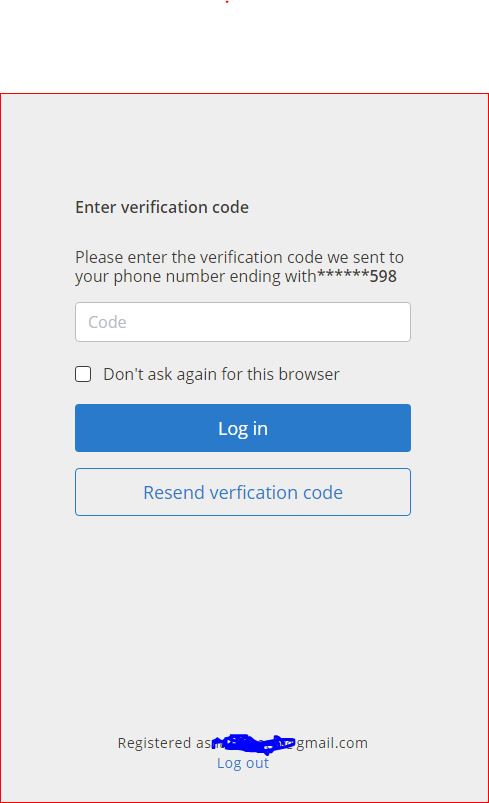
I have deleted my passwords from the panel and then logged me out from the account and now when I log into my account it wants sms verification code but I don't receive any! :/
-
Hi, I have the same problem when I want to log in to my account through 2FA, I dont receive sms with verification code sent to my valid tel. number. Please solve it asap.
0 -
Hi, I have bought Avira Antivirus Pro yearly subscription for 1 device. For activation I need to log in to my account. When I input the correct email and password, then I should input a verification code which has been send to my cellphone but I do not receive it. The tel. number is valid, as I used it before for logging in. Then I created new user account, inputed some of my passwords one by one (others are still in the old account, which I can not log in), then bought new subscription for 1 device for new user account, but the licence has been sent again to the old account.
I understand, that I have paied not a big ammount, as the special offer was with big discount, BUT still I have paid twice and can not use it.
Please solve the problem with the verification code, which I need for licence activation or advice how to withdraw from 2 contracts
Thank you Lazaryan0 -

Hello John Wolfer,
You write: Please solve as soon as possible, and Please solve the problem with the verification code
Only you can solve the error!Please enter your current data in your Avira customer account. Only you can do that, we do not know your current phone number.
Verification can only work with correct and up-to-date data about your address.
How should Avira know that you have changed your personal details in the 2FA
and that a wrong telephone number is stored for the verification of your address?With corrected data, a refund will be possible.
The cancellation:
Cancel your Avira subscription – Official Avira Support | Knowledgebase & Customer Support | Avira
and here is the refund:
Request a refund for your Avira order – Official Avira Support | Knowledgebase & Customer Support | AviraYou are writing here in a publicly accessible forum, personal data can and may neither be questioned nor answered in this forum according to the Data protection GDPR. Questions about your license or payment processing can unfortunately only be handled by the support team via your customer account by e-mail in accordance with the GDPR. Thank you for your understanding.
Unfortunately, we do not have access to your customer account.
If anything is still unclear, please let us know, and we will be pleased to help.Kind regards
0 -
Hello pascha45,
I am using Avira through 2 years and I know how to use it I guess. Every time for login I have received verification code by sms, after inputing it I was able to log in to my account. I remember my login and password. Now after purchase of licence I have got a mail with activation instruction. I followed to that link I have been asked to log in to my account. OK I wrote my login and password and what? The third step verification I can not pass, because I dont receive SMS for that. Before and always I was receiving that sms with that code. Now it doest working. That is why I asked to solve that bag. Login and password I remember, mobile phone and tel number is the same. Now I write from my new account, otherwise I dont know what to do else.
BTW I created a new Avira account (current one) and got the same offer of Avira Antivirus Pro with discount and thought OK I will try another one with the new account. I bought it and what? I have got the second email where is written that my Avira product was activated with my old account email. Why? If I am logged in with new account?
So I am again back to the begining. I have correct login and password, but for logging in, I need to be verified with 2FA by putting verification code, received by SMS, which I dont receive.
Let me know please, where is my fault? Or who support 2FA proceses? Link me please to them.
Best regards
-1 -
 0
0 -
P.S. BEFORE IT WAS WORKING, NOW NO
0
Vous devez vous connecter pour laisser un commentaire.
Commentaires
6 commentaires