


Menu to scan folder does not appear Avira
Terminée
I installed the new version of Avira and went to scan a folder with the right button and where is Avira? I can't scan, are you already aware of this?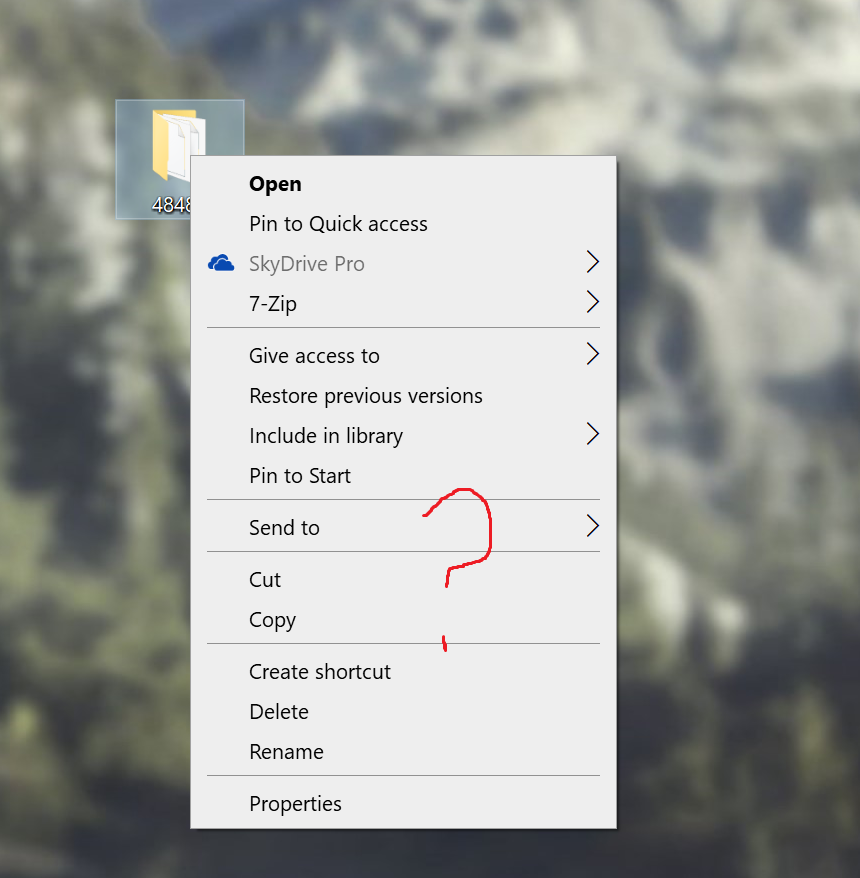
-

Hello Roberto,
We have seen that you have also contacted the support, have already created a ticket there and have already received an answer.
You will receive further information from support in the ticket you created yourself. Thank you for your understanding.Many greetings
0 -
Unfortunately the support didn't know how to answer me, they asked me to uninstall and install again, I did that and the same problem remains..
0 -
Hello Roberto,
It is important that the license is identical to the e-mail address used when ordering. In case of changes, a new installation is advisable.
If the behaviour has not changed after a new installation, please contact the support team again. Supposedly there is a fix for the shell extension to be able to run a scan from the context menu again afterwards. They will certainly try to replace this failure quickly.
We do not have access to your customer account here in the public forum, contact is unfortunately only possible via the support team.If anything is still unclear, please let us know, we will be pleased to help.
Many greetings
0 -

but could it be that it is a choice of the antivirus developer to remove it?0 -
@ Roberto
Hello Roberto,
It has now been confirmed that the technical department is trying to make this shell extension available again as soon as possible.
Best regards and have a nice weekend
0 -

I also have the same problem, is there any hope of a resolution? I've been told that the technicians are working on solving this problem... a month already seems like a long time...
0 -
Everytime I wanted to uninstall Avira an error message appeared claiming uninstall.dll or something like that was missing. Repairing produced the same error. So I tried to manually delete every Avira folder and everything was well until I uninstalled the Program Files folder which when restarting the PC produced a Blue Screen of Death loop until I either entered Safe Mode and restores the folder or I did a System Restore. I even tried soft reinstalling Windows 11 to no avail. The BSOD claims rtp_process_monitor.sys failed after deleting the Avira Program Files folder. I deleted that .sys file from the system32 folder but then Windows wouldn't even boot and I had to System Restore it again. So I have no way of deleting the Avira folder, the only option I'm left with is a full clean install of Windows, but I really don't want to do that.
0 -

Has this been fixed yet? If so what is the resolution?
0
Vous devez vous connecter pour laisser un commentaire.
Commentaires
8 commentaires