


Avira doesn't put files in the Ignore list

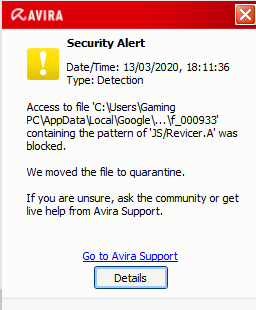
Avira has been giving me notifications about a JavaScript file within Google Chrome, all of a sudden, and I cannot put it in the Ignore List.
Every time I try to put it in the Ignore List, it tells me that the files were restored and that they were not added to the ignore list.
When I click on the hyperlinked "ignore list", nothing happens and I keep on getting the notifications, the moment I start up and use Google Chrome, which is very annoying.

Thanks in advance for your help.
edit: added a picture of the notification
-

This is happening to me also. I am unable to use a program I need for work because of this. How do i uninstall Avira????
0 -

Please see this article of how to uninstall Avira:
https://support.avira.com/hc/en-us/articles/360003162153-How-do-I-uninstall-my-Avira-product-
Best,
Arthur Lukas Huptas
Avira Community Manager
0 -

I had the same problem and in my case it was because size of ignore list in Avira Antivirus was full. It's very sad but maximum size of ignore list in Avira Antivirus not so big. But you can delete old records from ignore list and add folders to ignore list and this partially can solves the problem. But I still not understand why developers of Avira Antivirus can not to enlarge the size of ignore list...
0 -

Lukas Huptas So is that Aviras official take on this issue?
You recommend users to uninstall your program instead of recognize the issue and try to fix it?
If that's the official take on problems in general Avira all of a sudden feels like a very bad choice.
Because this still exist after over a year, I've lost count on how many times I've clicked 'always ignore' on a program I have but no matter what the next scan the same popup appears.
So will you fix it or are your recommendation still to uninstall Avira and find a better option?
0
Please sign in to leave a comment.
Comments
4 comments