


I don't understand how Antivirus Pro works
Terminée
Hello the community,
I've searched and searched, but I can't find anything in my dashboard and nothing in the help.
I have an Antivirus Pro subscription with which I can supposedly locate my phone, alert remotely, lock remotely, notify the owner and delete remotely.
All this is well and good, but how can I access these functions? I don't see anything on my dashboard that allows me to do all this. Is there something to do at the terminal level to activate these functions?
For the moment, these are only descriptions for me and if I ever lose my smartphone, I have no way of putting all these functions into practice.
If someone could tell me what to do, that would be great.
-

Hello Michel,
Unfortunately, we don't understand what you are saying.
You are writing here in the Avira Community, a publicly accessible forum - an user2user forum. We have neither access to your Avira customer account and your Avira installation, nor to your Avira license.
Here, the publicly accessible Avira Community is unfortunately no way to contact Avira Support. See - once more - the Avira Community guidelines: “How do I create a post? ⇒ Details are important”Avira Community Guidelines – Official Avira Support | Knowledgebase & Customer Support | Avira
Premium customers with a valid license and correct registration can contact the Avira support team directly from the Avira customer account under “SUPPORT”; via email, support chat and (in some cases) telephone.
Premium customers with a valid license and correct registration can contact the Avira support team directly from the Avira customer account under “SUPPORT”; by email, support chat and (in some cases) telephone.
You are writing - at least with information in the section - under Android. Have you looked up the instructions for Android?
https://support.google.com/accounts/answer/3265955?hl=en&sjid=6115090593727717583-EU
It would be useful if you made a little effort to read what you are ordering before ordering or installing.
All this can be found in the Avira Knowledgebase & Customer Support, or with the search engine of your choice on the Internet. Also, as with your 1st question, since everything is described in the community guidelines and has already been pointed out.
Thank you for your understanding.
Kind regards
0 -
Thank you for your reply.
I came here because I have search all the links you are giving above without finding what I was looking for.
The services I am speaking about are listed in my account but there is no explanation how they can be activated nor how they work.
But apparently this forum is useless and your duty here is not to help but to push people out.
Regards
0 -
Hello Michel,
Your frustration is understandable, but we have sent you the Avira Community instructions for creating a request in this forum.
Perhaps you have overlooked these instructions: We refer you to the Avira Community guidelines for the 3rd time!Details matter
Include as many details as possible in the description so that we can help you quickly and effectively.
Here are some examples of what your post should include:Do you own a free or Pro version?
Which device are you experiencing issues on?
Which product version do you own?
Which operating system are you using?
What have you tried so far to solve the problem?You have only indicated that you want to install the Avira Pro version. We cannot know what you are looking for. Your information is incomprehensible to us! Your information: “All this is well and good, but how can I access these functions? I don't see anything on my dashboard that allows me to do all this. Is there something to do at the terminal level to activate these functions?”
We have already explained to you that you can get this installation help from the support team. There you will find your OS data with version number and last update, your Avira version with last installation number. Your installation can be checked there if something is wrong or if you do not know how to install your purchased license.
You can describe to support how you proceeded with the installation, and they can check what you have installed! We are not sitting behind your device. You have not provided us with the information that is absolutely necessary for assistance!
Once again and for the last time: Premium customers with a valid license and correct registration can contact the Avira support team directly from the Avira customer account under “SUPPORT”; by e-mail, support chat and (in some cases) telephone. Thank you for your understanding.
Kind regards
0 -
Hello,
I thought it was clear enought in saying that :
"I have an Antivirus Pro subscription with which I can supposedly locate my phone, alert remotely, lock remotely, notify the owner and delete remotely."
It means that Antivirus Pro is installed on my equipement (PC and Android) and that I don't know how to use the features coming with it.
So sorry if I was not clear enought, I don't see which additional information above that I could give.
However, as you mentioned in your previous message, I have asked directly the support.
Thanking you for your patience and sorry for our misunderstanding, I I won't bother you anymore.
Michel
0 -
Hello Michel,
We do not understand your installation details. Your: "I thought it was clear enought in saying that :" ?
The support team can check your operating system and your installation.
You write: ‘It means that Antivirus Pro is installed on my equipement (PC and Android) and that I don't know how to use the features coming with it.’ ANDROID? In the Avira information about Avira Antivirus, only Windows and Mac are compatible! See the information:
Welcome to best-in-class malware protection. For Windows and Mac.
https://www.avira.com/en/antivirus-pro?
Avira provides a check for installation, information about the compatible operating systems.
That is why we asked you several times to provide detailed information about your installation, but you have consistently failed to do so.
Here is the description from Avira, which is also available to you, about the available operating systems for Avira Antivirus Pro. This allows everyone to check which licence is compatible with their operating system.
AVIRA ANTIVIRUS PRO - For Windows and Mac : https://www.avira.com/en/antivirus-pro? See the test at the bottom of the page.
See System Requirements ⇒ Read full specification
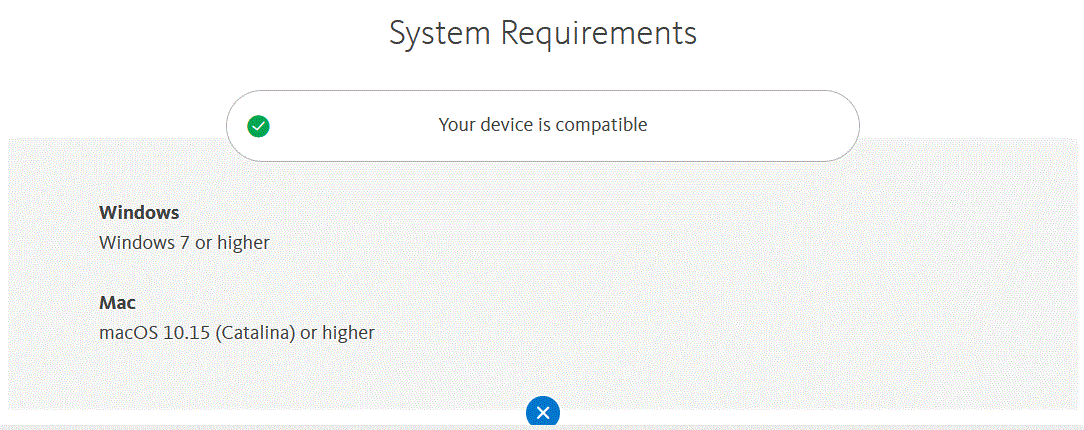
You have already contacted support, they will be able to clarify your request for a correct installation.
Kind regards
0 -
Hello Michel,
Now that Avira support has also confirmed you, that you are complaining about a missing installation that is not offered in your order and therefore cannot be available to you, we can consider this post closed.
Kind regards
0
Cette publication n’accepte pas de commentaire.
Commentaires
6 commentaires