


Banner Avira identity assistant
Terminée
I have a paid Avra Prime license. When I start the application, it shows a banner about the Avira identity assistant. When I click on it, it is just advertising from Avira.
How do I remove these unwanted banners permanently?
I already changed the notifications to Smart and Limited, but no change.
-

Hello Peter,
You are writing here in the Avira Community, a publicly accessible ‘user2user’ forum. From this forum, there is NO (!) access to your Avira installation and your Avira customer account. This is described in the Avira Community Guidelines, which are available to every Avira Community reader with information on the minimum information required, see:
Avira Community Guidelines – Official Avira Support | Knowledgebase & Customer Support | Avira
See the note from AVIRA available to you in the Avira Community Guidelines:
"The Avira Community is not a way to contact our support directly!"
See: ‘How to create a post? ⇒ Details matter!’
You have already had several contacts with Avira Support. Questions about the installation of your Avira software can only be answered by Avira SUPPORT. This has already been communicated to you in detail, see your post:
See: "Premium customers with a valid licence and correct registration can contact the support team directly from the customer account under ‘SUPPORT’..."
Your statement, ‘I have a paid Avra Prime licence,’ is not useful information for your installation!
Only with correct information can we help you with your activated Avira licence (with the latest installed update version number) and your Windows installation (with the respective latest update version numbers)!Here in the Avira Community, we adhere to the strict regulations of the General Data Protection Regulation (GDPR). Questions regarding your installation can only be answered by Avira Support via your Avira customer account in accordance with the GDPR. Thank you for your understanding.Best regards0 -
For your information!
It would be very helpful to provide meaningful information here in the forum regarding questions about licensing or installing Avira products so that readers of the Avira Community can get an idea of the question submitted.
See the "Avira" note, which is available to all readers of the Avira Community guidelines:
‘The Avira Community is not a way to contact our support directly.’
Here are the Avira Community guidelines, which are available to all customers and users:
Avira Community Guidelines – Official Avira Support | Knowledgebase & Customer Support | Avira
See: How to create a post? ⇒ Details matter!
Thank you for your understanding and for submitting correct enquiries.
0 -
Hello Pascha45.
In the meantime I contacted Avira support. And provided them with details about the Windows 11 version and the Avira version. Also a screenshot of the unwanted/unexpected banner I'm seeing on one of my PC's with the Avira desktop.
If we can solve the issue, I will publish more details plus the solution in this public forum.
Best regards,
Peter
0 -
Hello Peter,
Your information regarding your concern: ‘unwanted/unexpected banner I'm seeing on one of my PCs with the Avira desktop.’
Does this mean that this behaviour does not occur on all devices, i.e. only on 1 device?!
Your description: ‘two other Windows 11 PCs with the same Avira installation have no problems.’
So far, no further reports regarding your issue have been received here.
It is strange that this behaviour only occurs on one PC among your devices!You will receive further information from Avira Support.
Kind regards
0 -
Hello Pascha45,
Yes, this occurs only on 1 of my 3 PC's with Windows 11 with all current updates,
The PC with issues is a 'ASUS ExpertCenter PN64-E1(Barebone)'.
My Windows 11 installation on this PC is up to date (last weekend):
Edition Windows 11 Pro
Version 25H2
Installed on 11/04/2025
OS build 26200.7705
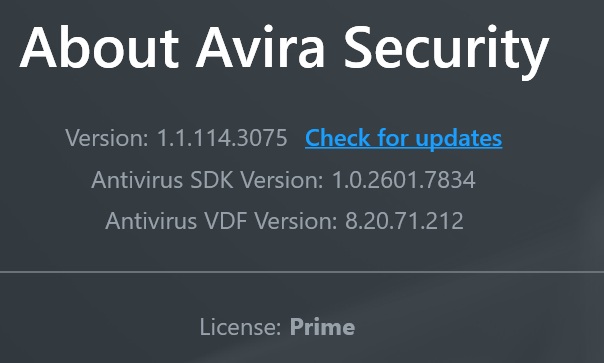
Experience Windows Feature Experience Pack 1000.26100.291.0My Avira Virusscanner is also up to date (last weekend):
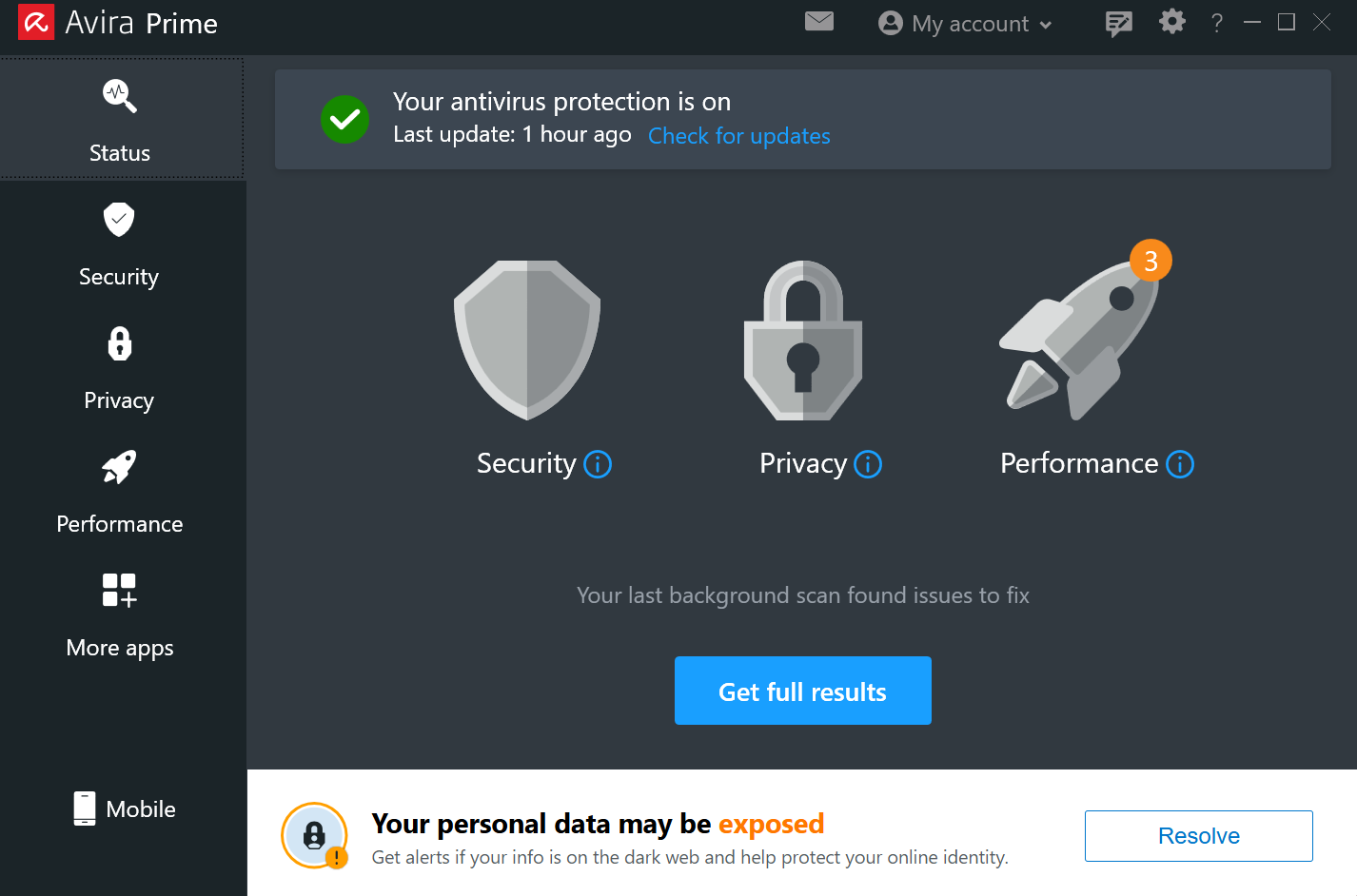
A screenshot of the unwanted / unexpected banner:
Best regards,
Peter
0 -
Hello Peter,
You have contacted Support with your query. An user2user forum does not have access to your settings. We have already informed you of this.
We are closing your post as you have contacted Support.
Duplicate processing unnecessarily prolongs the processing time.
You can find various descriptions of your purchased device on the Internet ⇒ "ASUS ExpertCenter PN64-E1 (Barebone)“.Once again, please note: We adhere to the strict regulations of the General Data Protection Regulation (GDPR). Questions regarding your installation can only be answered by Avira Support via your Avira customer account in accordance with the GDPR.
We have already informed you of this. Many thanks for your understanding.The Avira support team has responded to you.
Kind regards
0
Cette publication n’accepte pas de commentaire.
Commentaires
6 commentaires