


2 networks, 1 VPN
Completed
I have Avira Phantom VPN installed, and I'm having a few issues with it. My PC is connected to 2 networks, one is a 2 Gig internet connection, and the other is a 1 Gig home office connection. If I turn on and connect the VPN, it always uses the 1 Gig connection. How can I get it to use the 2 Gig connection instead?
I tried contacting support, but because I'm still on a trial subscription, they were very short with me, pointed me to a few articles unrelated to my question, then disconnected. At this point, if I can't get an answer, then a trial is all I will ever have. I certainly won't be paying for a service that is rude to potential customers.
-
 Hello Shawn,
You are posting here in the community, a public forum, we do not have access to your customer account nor to your installation.
Premium customers with a valid license and correct login can contact the support team directly from the customer account.
In the chat connection, you will be advised to log in from your customer account. This is the only way to contact the Prime support team immediately with the Prime connection, without any questions about your license, see:"If you have an account, please log in for premium support services." Only with correct login it is possible to get the full Prime service from the support team.
Premium customers with a valid license (including trial version) and correct login can contact the support team directly from the account via "SUPPORT"; via email, chat and (partially) phone.See the access to questions and to the support for Premium customers:
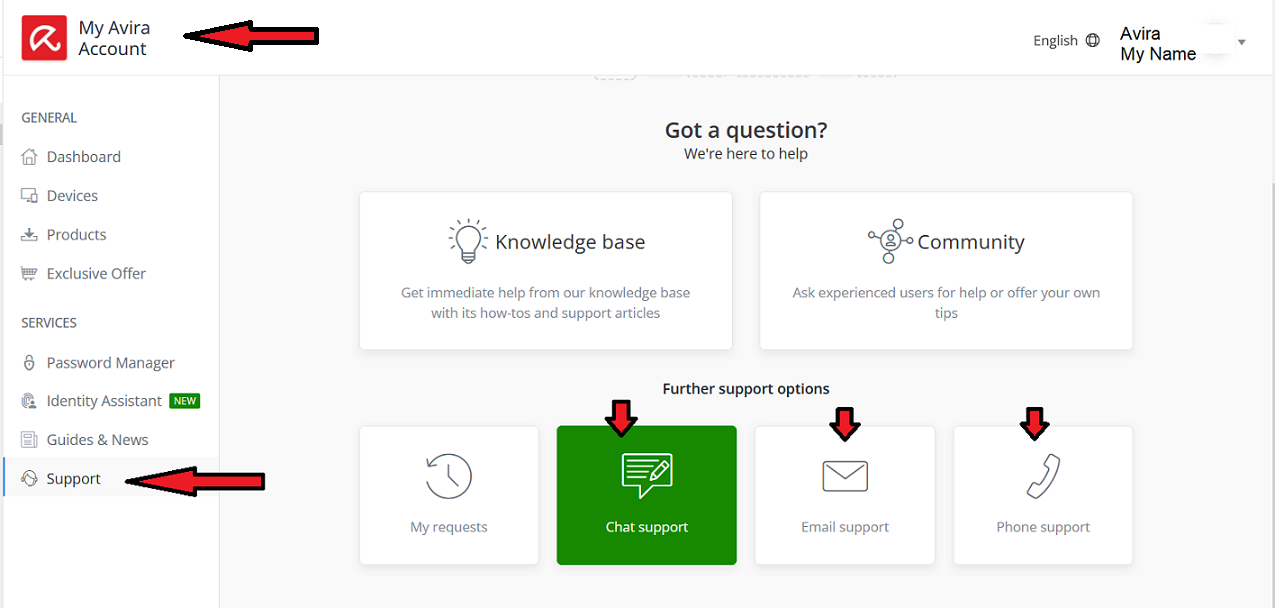
Questions about the license or your installation can only be handled by the support team according to the General Data Protection Regulation, i.e. GDPR-compliant. Here in the forum, unfortunately, only public contributions and not GDPR-compliant can be posted. The community is a public user2user forum.
Here, the publicly accessible Avira Community is unfortunately not a way to contact Avira Support directly.
See the Avira Community Guidelines:Avira Community Guidelines – Official Avira Support | Knowledgebase & Customer Support | Avira
Thank you for your understanding.
If something is still unclear, please let us know, we will be pleased to help.Kind regards0
Please sign in to leave a comment.
Comments
1 comment