


REQUEST FOR HELP!!! MY PRIME LICENSE IS NOT AVALIABLE
Completed
REQUEST FOR HELP!!!
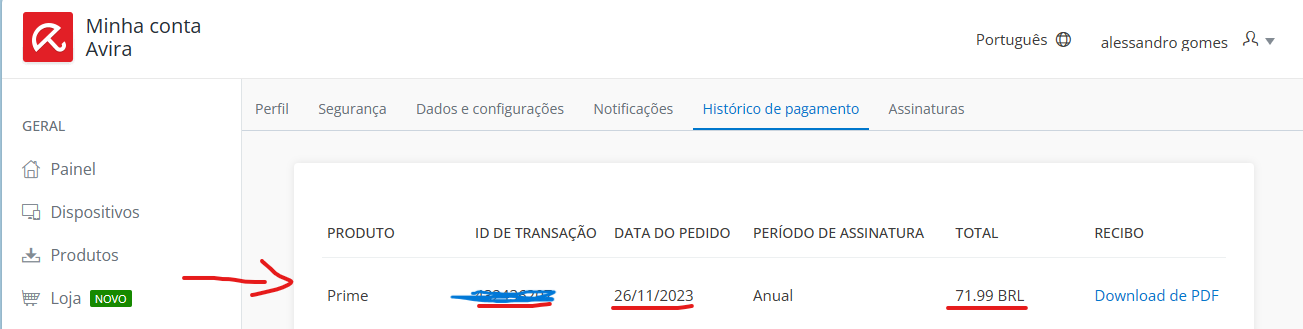
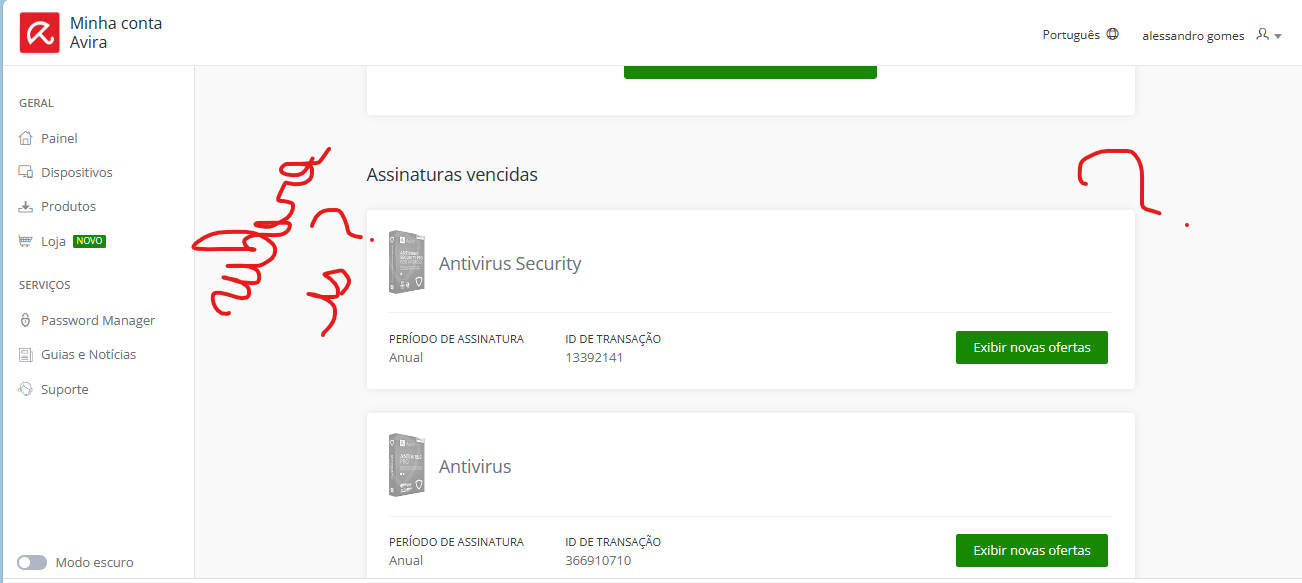
 On 11/26 I purchased the Avira prime license for 5 devices, after a few days all devices showed the free version of the antivirus. On the "my subscriptions" page the Prime license no longer appears but in the purchase records it appears that I purchased the license . I can't access support because only premium users have access, I'm desperate.
I have all the protocols and the purchase invoice. I need at least guidance.
-

Hello Alessandro,
Unfortunately, you didn't tell us how you logged in to your customer account and why your licence was no longer displayed after a few days, did it work before? Please check that you have logged in correctly.
Unfortunately, questions about your Avira version and your installation can only be answered by the support team via your customer account by e-mail in accordance with the General Data Protection Regulation, i.e. by e-mail in compliance with the GDPR. Here, the publicly accessible Avira Community is unfortunately not a way to contact Avira Support directly. See the Avira Community guidelines:
Avira Community Guidelines – Official Avira Support | Knowledgebase & Customer Support | Avira
Unfortunately, your pictures don't help. You have already made several (!) contacts to support. The digital assistant Mark drew your attention to this: "I am here to help, but my assistance is limited to your subscription level." and "If you have an account, please log in for premium support services."
A satisfactory answer can only be given and expected in the chat with correct information and registration.Premium customers with a valid licence and correct registration can contact the support team directly from the Avira customer account under "SUPPORT": via e-mail, support chat and (in some cases) telephone.
Below, you will find illustrated instructions on how to install the Avira Prime version:
How do I purchase and install Avira Prime on cross-platforms? – Official Avira Support | Knowledgebase & Customer Support | AviraBest regards with best wishes for the new year 2024
0 -

hello, I believe I have a similar problem. Please tell me how I can obtain help.
Our Avira subscription was apparently expired in Dec 23 although we got no notice. We got an email in Jan 24 inviting us to purchase Prime at -70%.
We proceeded to pay for that offer and reached the installation step.
The installation button did not deliver results. It delivered us to a dashboard where we could find no evidence of our purchase. We were expected to purchase a new license, please notice that the offers were more expensive.
Support articles tell us that we have no right to contact a real person, because we have no license. Support articles provide absolutely no solution for this infernal loop problem.
May I comment that it is not adequate for support to blame the victim - It is not our fault if Avira refuses to install the purchased license and also refuses to display any invoice or other proof of purchase. We are not being uncooperative with "Mark". Please indicate a telephone number to allow customers to actually contact you when "Mark" is unable to provide any solution.
0 -
Hello Marc,
You are writing here with an e-mail address that you created on 7.1.24. No licence is stored under this email address. This account was set up on O7.01.24, i.e. yesterday. An order from 23.12.23 can of course not be stored by Avira as the address of your order. Log in to your Avira customer account with the e-mail address that was used for the order from 23.12.2023.
The digital assistant Mark can then recognise your registered licence and will forward you to Avira Support, also the Avira telephone number.
Each subscription purchased in the Avira online shop is assigned to a customer account, which is always immediately assigned to the email address used for the purchase and is automatically activated under this email address.
Please check which email address was used to order the licence and use it to log in. The licence will then be displayed and can be installed directly from the customer account under "Subscriptions".
If you have paid with PayPal, it is also important to check whether you have entered your delivery address in the PayPal order process. See:The digital assistant Mark points out: "I am here to help, but my assistance is limited to your subscription level." and "If you have an account, please log in for premium support services." A good and satisfactory answer can only be given if you have logged in correctly.
Important! Every subscription purchased in the Avira online shop is assigned to a customer account, which is always assigned to the e-mail address used for the purchase and is automatically activated under this e-mail address.
Avira will not refuse to install the purchased licence, the correct login with your chosen access data (email address and your chosen password) is the correct component for the installation of your order. This is the only way to install the purchased licence. No Avira licence is stored under your e-mail address used here for this article.
Premium customers with a valid licence and correct registration can contact the support team directly from the Avira customer account under "SUPPORT": via email, support chat and (in some cases) telephone.
All these instructions have already been posted for information in the previous article on the supposedly same topic.Unfortunately, questions about your licence or payment processing can only be processed by the support team via your customer account in accordance with the General Data Protection Regulation, i.e. GDPR-compliant via email. You are writing here in the publicly accessible Avira Community, we do not have access to your customer account.
Here, you can find instructions on how to purchase and install the Avira Prime version:
Thank you for your understanding.
Kind regards
0 -
Thanks for your kind reply.
We have solved our problem with 90 minutes of investigation on 7 January followed by almost an hour today 8/01 with your live support telephone line.FYI, while we attempted to upgrade to Prime on 7/01 using this account, the purchase was by default registered not to this email, but to the email associated with the Paypal account used to pay!
This created an immense mess. We tried to solve it by changing the email associated with this account (so you say we created this account only on 7/01, which is frankly mixed up as an interpretation) but that did not solve it. We are very glad that Avira is not in charge of running nuclear power plants.
For anyone else reading this comment, I would suggest that you check the email to which your upgrade is registered; use or create an online account that uses that email; then UNINSTALL your existing Avira application from your device BEFORE you try to install the new upgrade. This was the instruction we received from live telephone support. There is no way we could have guessed it, since that instruction was included nowhere in the many links and buttons "Install" (email link, green buttons online, and "click here to install" when the new app downloaded by default - although it must not be activated before the old app is uninstalled). Jeepers.
1 -
Hello Marc,
Thank you for your feedback. First, we are pleased that the problem has been solved.
We are aware of the problem with PayPal payment, which is why we asked whether payment was made using PayPal. If the delivery address was added to the order according to the following instructions, and have also added the instructions for the PayPal order, see our answer:
"Please check which email address was used to order the licence and use it to log in. The licence will then be displayed and can be installed directly from the customer account under "Subscriptions".
If you have paid with PayPal, it is also important to check whether you have entered your delivery address in the PayPal order process. See:In these instructions, PayPal points out that a new PayPal address will be used for an existing account. Therefore, in order to avoid an unnecessary search, please insert the delivery address.
We are pleased that you were able to install your purchased licence and can now use it.
Best regards
0 -
Thank you for another polite reply. If these are KNOWN ISSUES, please RECTIFY THEM instead of saying after the fact that people should have read certain support articles. Note that when attempting to find articles without your help, the titles are completely hermetic. No one would guess to choose the "right one".
"Mark" could be redesigned as a trouble shooting facility and decision tree, instead of signing out when the client actually goes to READ the 3 or 4 useless articles "Mark" recommended.
I thank the very patient service person probably located in India who helped silver the "first uninstall" problem which you have avoided mentioning.
Good night.
1 -
*helped solve
0
Please sign in to leave a comment.
Comments
7 comments